


 |  |  |
When i click "Go!" once i select a sever it opens a box titled "Failed to start Minecraft"
 | | |
Okay here is what I have
OS: Microsoft Windows 7 Home premium 32 Bit
4 Gigs of ram
Java 6.0
and yet I am still getting this stupid error. I have uninstalled and reinstalled Java, and Minecraft and I even rebooted my computer and that. I downloaded Java today and I have re-downloaded it a second time in the same day. I am at my wits end on this one.


| |  |
Humm? i'm not to sure why this is happening but you should try Re-Installing World of Minecraft and JAVA, if you take a screen shot of your screen by pressing, CRTL, ALT and PRT SC (Print Screen), then press CRTL C, go into paint an press CTRL V and then Save as a JPG and upload it so i can see what this 'Pop up box' is. :)


| | |
better option is to use the Snipping Tool if you have win vista or win 7.

| |  |
Java 7 is out so try that
| | |
Here it is
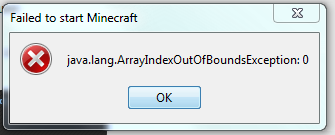
I have also installed Java 7 AND Reinstalled Minecraft and still no dice.
| | |
What a problem you have, i have never ever seen one of those pop ups before :(
It might be some sort of 'Parental Lock' or 'Administrator Lock' If you have one of those on there.
| | |
Alright. I tried to run this as an administrator and I even rebooted my computer. Still no dice.
| | |
Try uninstalling old java and get java 6, java 7 is not stable. meaning it may have some bugs.
| | |
I tried to uninstall both Java 7 and 6 along with Minecraft. I then rebooted my computer and done a disk defrag and a disk clean up. I also ran virus scans and even spyware scans as well. I rebooted my computer after that. I then proceeded to install Java 6 and tested it make sure it runs. And then I re-installed Minecraft. It is still giving me the problem.
_____________________________
Failed to Start Minecraft
__________________________
Java.lang.arrayIndexOutOfBoundsException: 0
I have been at this for months now and still no dice.
| | |
Bump. I am still not with a resolved problem. I have done EVERY THING that can ever be done and I am still not having any kind of dice. IT has been also locking up when that error message pops.
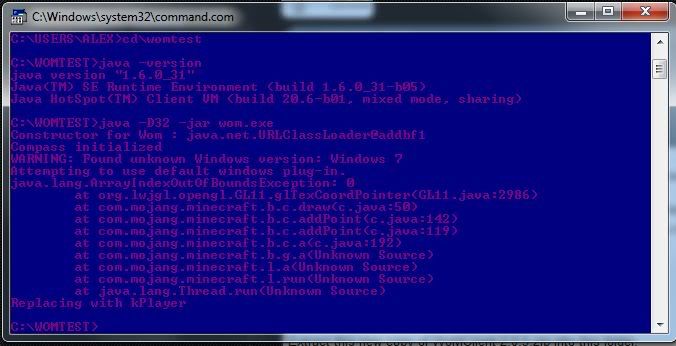
This is also what I have done is that I followed the instructions here.
http://www.worldofminecraft.com/debug
And This is the result
{Edit}
I tried to run it in compatibility mode with Windows Vista (Service Pack 2) and Windows XP the latest service pack and still no dice. Yes I am running this as an administrator.
| | |
smh you don't need to install anything, what's wrong IMO is that java is trying to use more memory than is allotted. Go under your java via the control panel and alot more memory to it...
| | |
All I was able to find was the memory size file in the Temporary internet files section and It is at 1000 MB's for memory.
| | |
again I will post it here:
Allocating More Memory To Java
Step 1.
Open CONTROL PANEL.
Step 2.
Type 'Java' inside the 'Search Control Panel' box.
Step 3.
Click the Java icon that pops up.
Step 4.
Click the Java tab.
Step 5.
Click View...
Step 6.
Assure there is only ONE line in here, any more lines could cause issues.
If you have multiple lines uninstall all versions of Java from your system and...
...download Java JDK 7 from the following link.
Make sure to get the x64 version if you have a 64-bit OS.
http://jdk7.java.net/download.html
Step 7.
Change Runtime Parameters.
I have mine set to:
-Xincgc -Xmx2048M

Change it depending on how much RAM you have.
For 32-bit Operating Systems 768M is recommended.
If you have 64-bit, or that doesn't work, continue to try the following
1G
1536M
2G
As I said, this varies depending on how much System RAM you have.
Step 8.
Click OK.
Step 9. (OPTIONAL)
Restart your system, not necessary.
| | |
Okay after following these instructions I am still running into the same problem. I am going to run another debug and see what it will say this time. I will make the picture and post it here once I have ran the debug.
{Edit.}
It came across my mind that after I upgraded from Windows Vista to Windows 7 I did not put my video drivers back in. So I am going to go try doing that and see if that will work
| | |
Well Hallelujah. I got my video drivers installed and it worked I was only able to just turn my self a little and it froze but other than that I don't think I will have that nasty problem again for as long as I have my video drivers installed.
I would keep this opened for others that are not able to get past that problem even with the video drivers being installed.
Thanks for all the help that you have given me.
| | |
Still getting this problemo.
WoM Coins: 24
I too am getting this. please help